DRACO7RT · tables and stored commanding guide · 28 October 2026
Tables and Stored Commanding
What a flight table is, how the vehicle runs a stored command sequence, and how to build one, check it, send it up and prove it with the Table Workbench
Every tunable number on DRACO7RT lives in a cFE table. Every autonomous response is a stored command sequence. The Table Workbench (https://draco.efsi.com/tables/) builds both from the real command dictionary, checks them against fifteen rules, delivers them by CFDP and reads them back from the vehicle.
Slides 2 to 5 explain tables and stored commanding in cFS. Slides 6 to 14 are the work instructions: the workbench, building and saving a sequence, editing an app table, the checks and the rules, delivery, dump and start. Slides 15 to 20: telemetry, troubleshooting, what was proved, engineering notes, the safety rules that come last, and what is left. Words in bold are buttons, tabs or page names exactly as they appear on screen.
Tables
A table is a block of numbers the flight software reads, that you can replace without a rebuild
What a cFE table is
A C structure an app registers with Table Services (CFE_TBL) by name, e.g. LC.LC_WDT or ACS.CFG_TBL
Its image is a file: a cFE header (name, size, description) followed by the bytes of the structure, big-endian as the PowerPC stores them
Loaded at start-up from /cf; replaced at run time through four ground commands: LOAD_TBL, VALIDATE_TBL, ACTIVATE_TBL, DUMP_TBL
The owning app validates every candidate image with its own callback and names what it rejects
The rule on DRACO7RT
Any constant with a chance of changing is a table value: gains, thresholds, limits, timers, rates, model parameters, boot policy
A #define is only for structure: message ids and layouts, loop period, pipe depths, array sizes, hardware counts, physics
An app does not run without its table; there is no compiled-in fallback
Written down in CLAUDE.md; a new tunable that is not in a table is rejected in review
34 table files in the catalog
Mission apps: ACS CFG and SIM, NAV CFG, IMU CFG (built 27 October, 57 former compiled constants)
Autonomy: LC watchpoints and actionpoints (WDT, ADT); SC RTS 1 to 7 and ATS 1
All 34 layouts come from the debug information of the compiled table objects, never from reading headers
See them: Table Workbench › 02 App tables, list on the left. The header chip Vehicle tables (top right) counts every table registered on the vehicle: 50 on 10 November
Vocabulary used in this deck: active image = the copy the app reads now; inactive image = a candidate loaded but not yet activated; working buffer = Table Services’ holding place for a load; dump = the active image written back to a file.
The life of a table
From a file on the ground to the image the app reads, with a check at every step
1 Build
The workbench writes the .tbl file: cFE header naming the table, then the bytes of the structure
Refused if: the layout or a limit is wrong (03 Check)
2 Uplink
CFDP Class 2 from the Yamcs bucket to /ram/ on the vehicle; name 19 characters or fewer
Refused if: commanding is not on Yamcs, or the name is too long
3 Load
CFE_TBL LOAD_TBL reads the file into a working buffer; the header must name a registered table
Refused if: wrong name or size, or no buffer free (4 shared)
4 Validate
VALIDATE_TBL (inactive) asks the owning app; LC, SC, ACS, NAV and IMU each answer with an event
Refused if: the app’s callback says no, by name
5 Activate
ACTIVATE_TBL, then the app’s next manage installs it and reports the new version
Refused if: not validated first
6 Dump and compare
DUMP_TBL writes the active image to /ram; CFDP brings it down; the tool diffs it against what was sent
The proof: byte-identical or it is not done
Undo at any point:ABORT_LOAD frees the working buffer; the active image never changed. A failed delivery in the workbench sends it for you.
For the next boot the same file must also be staged into /cf (04 Deliver: tick also stage it for the next boot): anything in /ram is gone at reboot.
The trail: CFE_TBL housekeeping (last file loaded, last table updated, validation counters) and events from Table Services and the owning app.
Stored commanding
The SC app plays command sequences from tables: relative time (RTS) or absolute time (ATS)
RTS: relative time sequence
A list of commands, each with a delay in whole seconds from the previous one
Each entry is the delay plus the complete command packet, exactly as the app would receive it from the ground, checksum included
Starts on demand: ground START_RTS, an LC actionpoint, another RTS, or SC itself (RTS 1 at power-on, RTS 2 after a processor reset)
Table SC.RTS_TBLnnn, file /cf/sc_rtsnnn.tbl; the vehicle’s autonomous responses all live here. Edit: Table Workbench › 01 Sequences; state: Viewer › Mission › Sequences (ATS/RTS)
ATS: absolute time sequence
Commands tagged with a spacecraft time; SC sorts them and fires each when the clock reaches it
For a timeline planned on the ground: a pass, a manoeuvre, a day of operations
Two buffers of 16 KB, up to 1 000 commands each; START_ATS and STOP_ATS; continues past a failed command by configuration
Table SC.ATS_TBL1: Table Workbench › 02 App tables › group SEQUENCES shows and exports it (badge view only); the ATS editor is not built yet
The numbers in this build
Limit
Value
RTS slots
8 (upstream 64)
RTS buffer
300 bytes each
Command packet
8 to 256 bytes
Commands per second
8
Delay
0 to 65 535 s, unsigned
Start/finish events
RTS 1, 2 only; 3 to 8 at DEBUG
Checksum
cFE XOR, per command
Autonomy chain on DRACO7RT: a telemetry value → LC watchpoint (compare) → LC actionpoint (logic, persistence) → START_RTS n → the commands in slot n. The RTS id is the join between the LC tables and the SC tables, which is why the workbench shows it by name everywhere.
The sequences the vehicle flies
Seven sequences fill slots 1 to 7; slot 8 is free and was used for the end-to-end proof
See them live: Table Workbench › 01 Sequences › RTS slots (the list on the left: name, steps, badges) or Viewer › Mission › Sequences (ATS/RTS) (state per slot).
Slot · name
Steps (delay from the previous step)
Started by
RTS 1 · power-on autonomy arm
+0 s SC ENABLE_RTS_GROUP 2 to 7 · +1 s LC SET_APP_STATE ACTIVE
SC itself, at power-on
RTS 2 · solar-array deploy
+0 s ACS ARM_DEPLOY channel 0 · +2 s ACS FIRE_DEPLOY channel 0
RTS 5 at +15 s
RTS 3 · antenna deploy
+0 s ACS ARM_DEPLOY channel 1 · +2 s ACS FIRE_DEPLOY channel 1
RTS 5 at +23 s
RTS 4 · momentum dump
+0 s ACS DUMP_MOMENTUM · +60 s LC SET_AP_STATE AP 0 ACTIVE (re-arms the trigger: LC sets an actionpoint passive after it fires)
LC actionpoint 0 (wheel momentum over the watchpoint), or the ground
RTS 5 · LAUNCH sequence
+0 s ACS LIFTOFF · +15 s SC START_RTS 2 · +8 s SC START_RTS 3
Ground: the mission test’s launch step
RTS 6 · GPS spoof response
+0 s NAV SET_VALIDATION ON
LC actionpoint 1 (NAV latched a rejected GPS fix)
RTS 7 · IMU fault response
+0 s ACS SET_RATE_SOURCE INTERNAL · +1 s IMU SET_VALIDATION ON · +1 s ACS NOOP
LC actionpoint 2 (IMU fault)
RTS 8 · free
27 October: ACS NOOP · +2 s NAV NOOP · +2 s IMU NOOP, built in the workbench and flown
Ground, from the Deliver tab
Sources: cFS/draco_rtems_defs/tables/rts/sc_rts00n.json (what the workbench edits) and the generated sc_rts00n.c (what the build compiles); proved word-identical for all seven. Without RTS 4’s re-arm the first dump was the last.
Work instruction · the Table Workbench
One page, four tabs, left to right: build, check, deliver, prove
01 Sequences
Left: RTS slots, one per RTS with its name, badges and vehicle state. Right: the editor. Add commands from the dictionary, set the delays, watch the 300-byte BUFFER bar, see the exact bytes. Save to the project, export, import.
02 App tables
Left: Tables, grouped by app. Right: the table as a form: units, limits, menus, descriptions. LOAD FROM the project file, a live dump of the vehicle, or an uploaded file. Changes highlighted.
03 Check
Fifteen sequence rules, or the owning app’s own validation mirrored for an app table. Verdict READY, READY, WITH WARNINGS or NOT READY, every finding in plain words; the Rules panel below.
04 Deliver
Send to vehicle…, a plain-language confirmation, then one audited job: uplink, load, validate, activate. Then Dump from vehicle & compare and Start the sequence & watch…; Vehicle events below.
Open it: https://draco.efsi.com/tables/, or front door › tile Table Workbench, or Viewer › Mission › Table Workbench. Same sign-in as everything else. Tabs run across the top under the title. The three greyed tabs at the right, Watchpoints, Actionpoints, Hazards & rules, come after the hazard analysis (slide 19); clicking one only shows a note. Header, top right: chips Vehicle tables, Last activated, Commanding (COSMOS or YAMCS), Job (idle or the running job), and Viewer.
Built from the truth: the command dictionary is read from COSMOS (265 commands, 23 targets, with the limits from the audit against the flight binary); the table layouts from the debug information of the compiled tables; the meanings and units from one file, tools/tables/meta.yaml.
Work instruction · 01 Sequences · build
Build a sequence: pick a slot, add commands, set the delays
Do
Open https://draco.efsi.com/tables/; it opens on 01 Sequences. In RTS slots on the left, click a slot, e.g. RTS 8 (“empty slot”). Badges: project (JSON source), C, staged (.tbl in /cf), draft, then SC’s state: READY, DISABLED, EXECUTING
At the top of the editor (right) type NAME (for people) and DESCRIPTION (file header; the counter shows n/31)
Click + Add command under the rows. In the new row pick the app in the target menu, then type in the command box: matching commands drop down (by name or description); click one. Its parameters appear with their defaults: menus for enumerations, min and max on hover
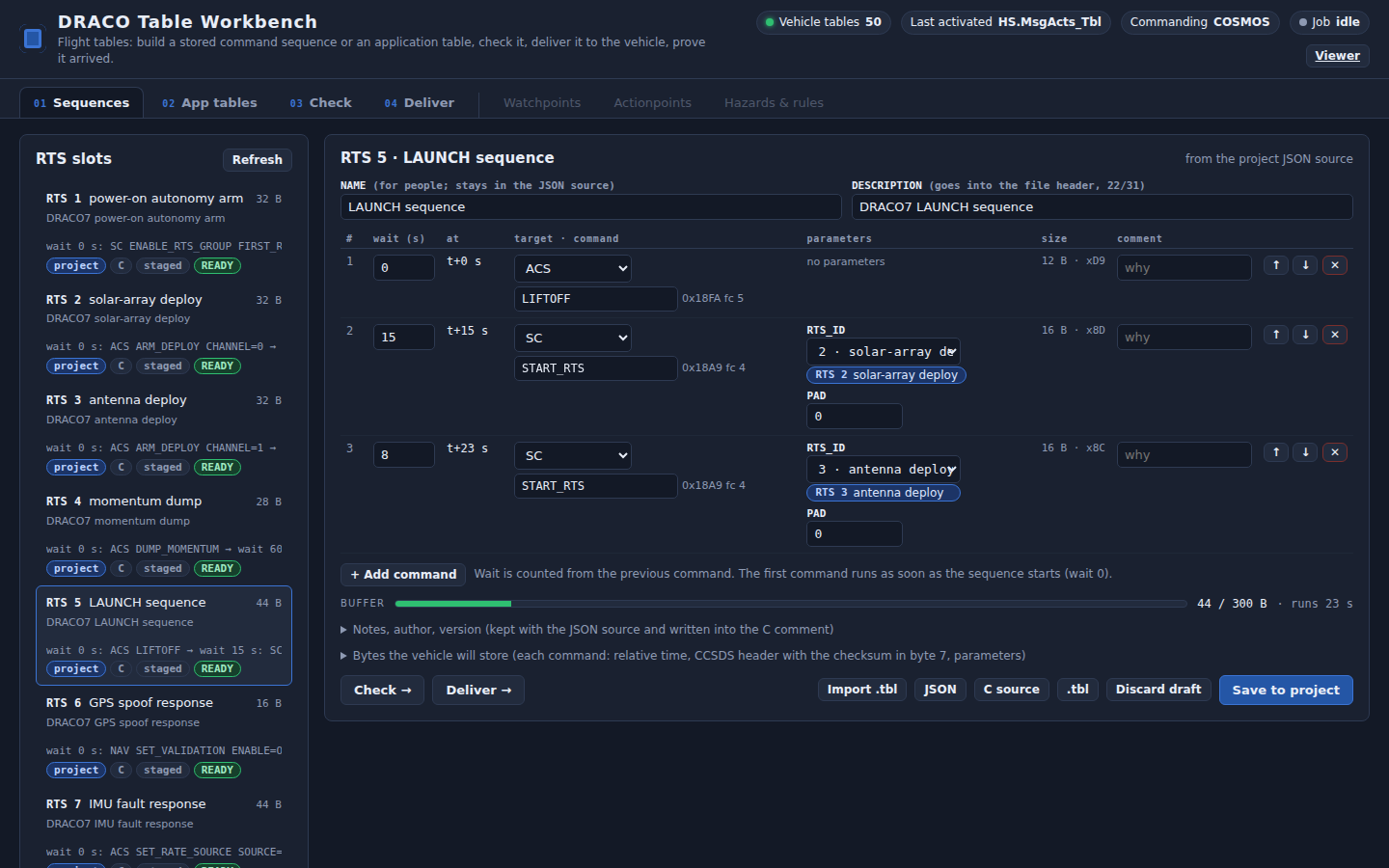
Type wait (s) on each row: seconds after the previous command; the at column shows the running total (t+15 s). ↑↓✕ at the right move or delete a row; comment holds the why
You should see
Size and checksum in each row’s size column (e.g. 16 B · x9E); under the rows the BUFFER bar (x / 300 B · runs n s) and inline errors as you type
A START_RTS or ENABLE_RTS parameter is a menu of named slots (“2 · solar-array deploy”) with a chip, never a bare number
Sequences tab, 27 October: RTS 5 LAUNCH sequence open; its two START_RTS steps show the slots by name. Left: RTS slots. Right: the editor; bottom row: Check →, Deliver → … Save to project
Next slide: saving to the project, exporting, importing a .tbl, drafts. Then Check → (bottom left of the editor) opens 03 Check.
Work instruction · 01 Sequences · save, export, import
Keep it: save to the project, or take the file with you
Save to project
Click Save to project, the blue button at the bottom right of the editor
It writes the JSON source (cFS/draco_rtems_defs/tables/rts/sc_rts00N.json) and opens a dialog: Saved the JSON source: … with the diff of the C table file sc_rts00N.c
Click Write the C source too or JSON only (Done when the C file already matches)
A new slot such as RTS 8 also needs its C file listed in cFS/apps/sc/CMakeLists.txt (APP_TABLE_FILES); the dialog says so
Refused while the sequence has errors: “The sequence has errors; fix them before saving”.
Export, import, drafts
Bottom right of the editor: JSON, C source, .tbl download the file (only for a sequence without errors)
Import .tbl decodes a .tbl from a vehicle dump or a build into this slot as a draft, so an unknown sequence can be read back
Drafts autosave in this browser (badge draft); Discard draft drops yours and re-reads the project
Expanders under the BUFFER bar: Notes, author, version and Bytes the vehicle will store (the exact hex)
Then
Check → (bottom left) opens 03 Check on this sequence
Deliver → opens 04 Deliver
The .tbl in /cf for the next boot comes from the next cross-build (draco.sh rtems fsw + sync_cf), or tick the staging option on 04 Deliver
Saving changes files in the project, not the vehicle. Nothing reaches the vehicle until 04 Deliver.
Work instruction · 02 App tables
Change a number in any table: open it, edit the field, see what changed
Do
Click the 02 App tables tab. In Tables on the left (grouped by app: AUTONOMY, MISSION APPS …) click one: LC.LC_WDT, ACS.CFG_TBL, NAV.CFG_TBL …
It opens from the staged file. LOAD FROM row: Project file (/cf) = what the next boot loads; Vehicle (dump now) = runs a dump job (04 Deliver opens) and brings the active image back into the editor; Upload .tbl
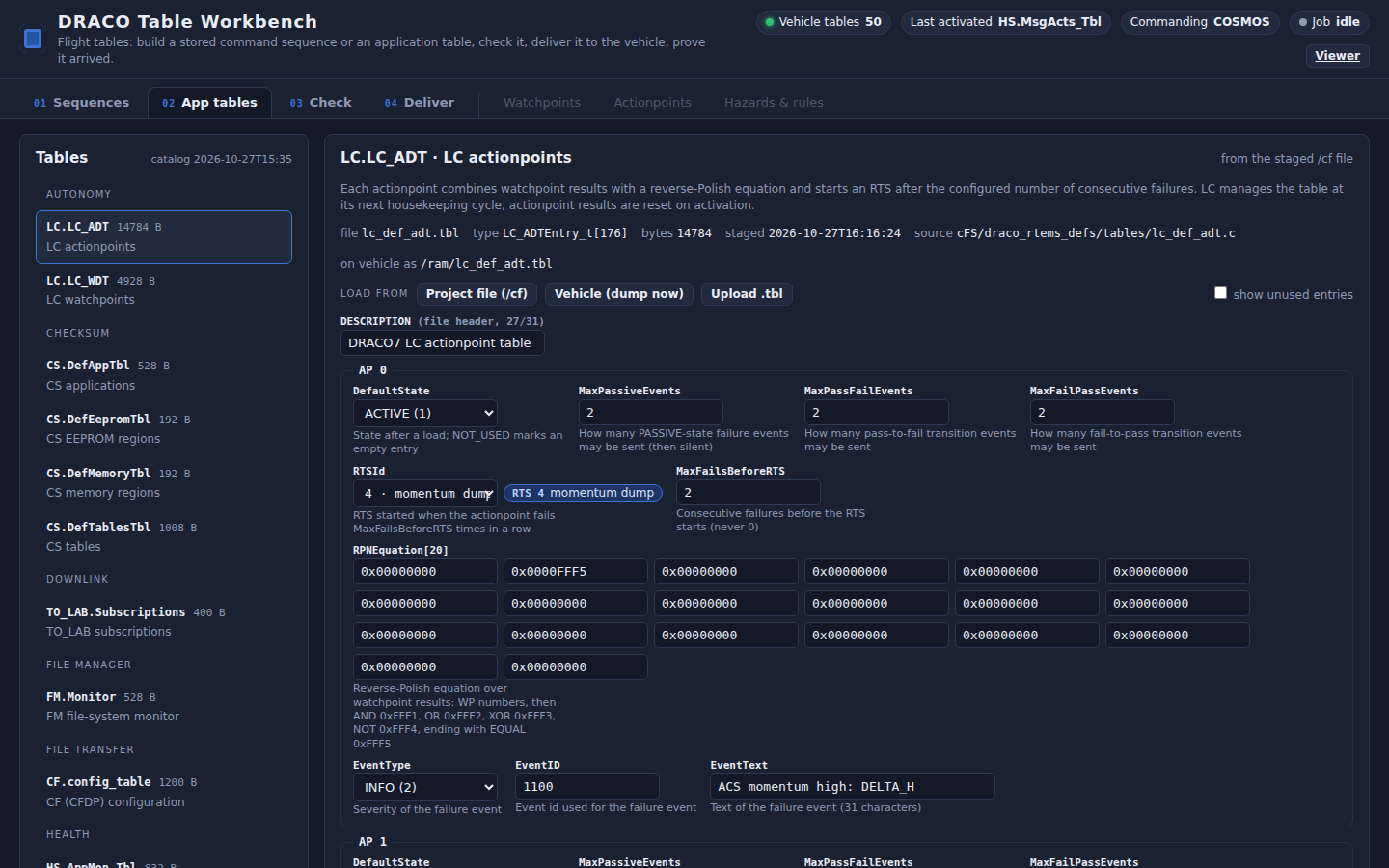
Edit the field. Each shows its meaning, unit, limits and, for enumerations, a menu. Unused entries of the big tables are hidden: tick show unused entries (right end of the LOAD FROM row), or Show all / Use next free entry
Read the line under the form: identical to the staged file or n field(s) differ from the staged file: …; Revert edits (bottom right) undoes everything
Press Check → (bottom left)
Worked example, 27 October
LC.LC_WDT, watchpoint 0 comparison value 4.0 → 4.5 (the momentum-dump threshold), delivered, validated by LC (3 good, 0 bad, 173 unused), dumped back as 4.5, then restored to 4.0 the same way
App tables tab: LC actionpoint table; each actionpoint’s RTS is a named chip, click it to open that sequence. Bottom row: Check →, Deliver →, JSON, C source, .tbl, Revert edits
LC comparison values are typed as the data type the watchpoint declares (float or integer), so a float threshold is never stored as an integer by mistake. Raw buffers (ATS, the SCH message table, HS message actions) carry the badge view only: view and export.
Work instruction · 03 Check
Nothing goes near the vehicle without a verdict
Do
Click Check → (bottom left of either editor) or the 03 Check tab; it opens on what you were editing (title: the RTS chip or the table name). Run again (top right) after any change
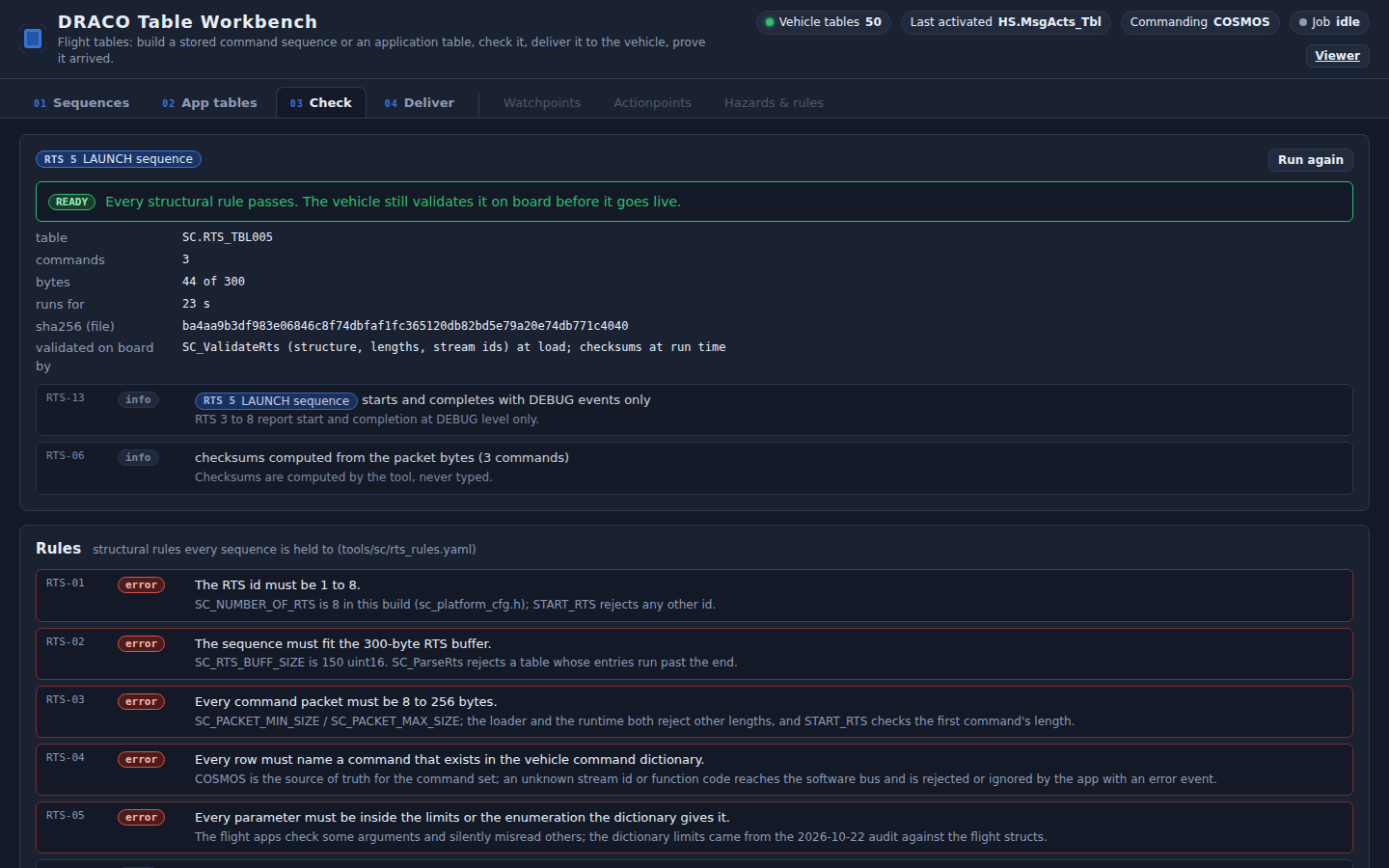
Read the verdict bar under the title: READY, READY, WITH WARNINGS, or NOT READY; below it the summary (table, bytes, sha256, validated on board by)
Each finding: rule id on the left, a badge error / warn / info, what to change in plain words and the reason in grey; an RTS it mentions is a chip you can click
Fix errors in the editor. A warning is a known trap: decide, and say so in the sequence notes
On 04 Deliver, Send to vehicle… stays greyed while there are errors: Delivery is blocked while the Check tab shows errors.
What is checked
Sequences: the fifteen structural rules (next slide; also the Rules panel at the bottom of this tab): slot, buffer, packet sizes, dictionary, limits, checksums, bus limits, rate, chains, hazardous commands, events, description
App tables: the limits and enumerations from meta.yaml plus the owning app’s own validation mirrored on the ground: LC WDT and ADT, ACS CFG and SIM, NAV, IMU, CF, TO_LAB, SCH
Check tab on RTS 5: the verdict, then each finding with its rule and the sequences it refers to
The same engines run from the shell: tools/sc/rtscheck.py on the sequence JSON files and tools/tables/tblcheck.py on every staged table, so a check can be part of a build gate. The rules live in tools/sc/rts_rules.yaml, one entry each with the reason.
The sequence rules
Fifteen structural rules, each with the reason it exists in this build
Rule
Level
What it requires
RTS-01
error
The RTS id is 1 to 8 (8 slots in this build)
RTS-02
error
The sequence fits the 300-byte buffer
RTS-03
error
Every command packet is 8 to 256 bytes
RTS-04
error
Every row names a command in the vehicle dictionary
RTS-05
error
Every parameter is inside its limits or enumeration
RTS-06
info
Checksums are computed by the tool, never typed
RTS-07
error
At least one command
RTS-08
error
No more than 4 commands to one app at the same time tag (the software-bus limit; this broke RTS 1 once)
Rule
Level
What it requires
RTS-09
warn
No more than 8 commands due in one second (later ones slip)
RTS-10
error
A START_RTS names an existing slot, never itself
RTS-11
error
Chains of START_RTS do not loop and stay 8 deep or less
RTS-12
warn
A command marked hazardous needs a deliberate decision: no operator prompt on board
RTS-13
info
RTS 3 to 8 report start and completion at DEBUG only
RTS-14
error
Delays are whole seconds, 0 to 65 535, from the previous command
RTS-15
error
The description is 31 characters or fewer; the table name is fixed by the slot
error = the vehicle would reject or mis-run it; warn = legal but a known trap; info = worth knowing. On screen: Table Workbench › 03 Check › Rules panel (bottom). The GPM hazard and inhibit rules (slide 19) are a separate, later layer.
Work instruction · 04 Deliver · send
Send it to the vehicle: one confirmation, one audited job, the whole chain
Do
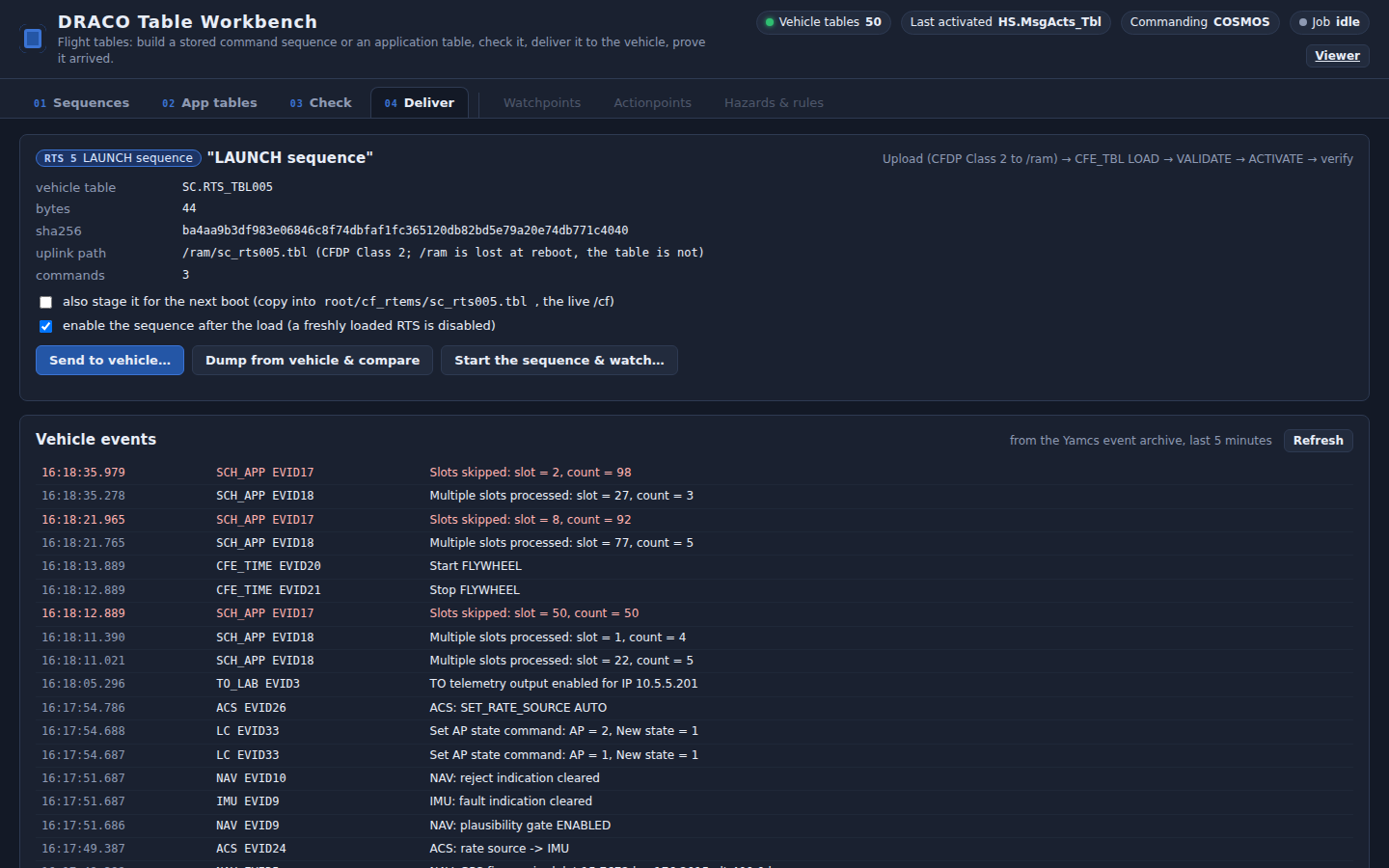
Click Deliver → (bottom of the editor) or the 04 Deliver tab. Read the summary under the title: vehicle table, bytes, sha256, uplink path (/ram/…), and the number of commands (RTS) or the changes against the staged file (app table)
Options, two checkboxes under the summary: first also stage it for the next boot (copies the file into root/cf_rtems/…, the live /cf), unticked; then enable the sequence after the load (a freshly loaded RTS is disabled), ticked by default, RTS only
Click Send to vehicle… (blue, left of the button row). A dialog asks Send RTS 8 … to the vehicle? and says in plain words what will happen; click Send (or Cancel)
Watch under the buttons: the steps upload · load · validate · activate (+ enable rts, stage) turn green one by one, red on a failure, with the timed job log beneath; then Events during the job
Deliver tab: the summary names the sequence and counts its commands, and the dialog asks once. Measured for RTS 8 on 27 October: upload 416 B in 1.0 s, load reported in 0.6 s, installed 1.0 s after validation
While it runs, the header chip Job shows the job and Commanding reads YAMCS for the transfer only. The Vehicle events panel at the bottom of the tab lists the last 5 minutes from the Yamcs event archive (Refresh at its right).
Work instruction · 04 Deliver · what you should see
The job log, step by step, and the three guarantees
You should see, in order
upload: file staged in the Yamcs bucket cfdpUp; commanding switched to Yamcs (header chip Commanding reads YAMCS)
CFDP Class 2 upload to /ram/, then commanding back to COSMOS
load, validate: CFE_TBL LOAD_TBL, then VALIDATE_TBL, and the owning app’s event, e.g. SC validation successful for inactive ‘SC.RTS_TBL008’
activate: ACTIVATE_TBL only if still needed, then Successfully Updated and the new name in CFE_TBL housekeeping (header chip Last activated)
enable rts (option on): ENABLE_RTS, and the slot’s badge on 01 Sequences reads READY
Three guarantees
One job runs at a time (a second one is refused: Another job is running … wait for it), and every job is written to the sign-in record with who ran it
A failed delivery sends ABORT_LOAD so the shared buffer is freed and the active table is untouched
Yamcs commanding is on only for the transfer; the table commands go through COSMOS, so the one-commanding-station rule holds
Then prove it: Dump from vehicle & compare, and Start the sequence & watch… (next slide).
Work instruction · 04 Deliver · prove it
Read it back from the vehicle, then run it and watch
Dump from vehicle & compare
04 Deliver, button row: click Dump from vehicle & compare (beside Send to vehicle…); nothing to fill in, no dialog
Steps dump · downlink · decode: CFE_TBL DUMP_TBL of the active image to /ram/d_<name>.tbl; the job waits for the “Successfully dumped” event, not a timer
CF TX_FILE Class 2 brings it to the Yamcs bucket cfdpDown
The result box shows the diff against the staged file and against the editor (rows vs staged file, vs the editor / vs this sequence); an app table also offers Load the vehicle’s values into the editor
Pass = identical. Any difference is listed field by field.
Start the sequence & watch
Click Start the sequence & watch… (right of the dump button; RTS only). The dialog Start RTS n on the vehicle now? names the slot and lists its commands; click Start it
Steps enable rts · start rts · watch: SC ENABLE_RTS if the slot is disabled, then SC START_RTS
The job records SC housekeeping before and after, and every event while it runs (at least 10 s)
Read the events and the rows commands dispatched, errors, RTS_CMD_CTR, RTS_ACTIVE_CTR: each command’s own app answers, at the time the delays say
It runs what the vehicle holds in that slot, not the editor. Use it on a real sequence only on a vehicle whose state you mean to change: it really runs.
Measured, RTS 8, 27 October
Observed
Value
ACS NOOP event
16:19:03.178
NAV NOOP event
16:19:05.177
IMU NOOP event
16:19:07.178
Spacing, as built
2.0 s
RTS_CMD_CTR
2 → 5
RTS_ACTIVE_CTR
1 → 2
RTS_CMD_ERR_CTR
0 → 0
Dump of LC.LC_WDT
identical, twice
A dump is also how you read a table you did not write: Table Workbench › 02 App tables › LOAD FROM › Vehicle (dump now) opens the active image of any table in the editor. Dump files in /ram are gone at reboot; the downlinked copy stays in the bucket and the evidence folder.
Telemetry
What the vehicle tells you about its tables and sequences, and where to read it
Packet
Items that matter
Where
CFE_TBL HK_TLM_PKT, once a second
LAST_FILE_LOADED, LAST_TABLE_LOADED, LAST_UPD_TBL_NAME and its time, LAST_FILE_DUMPED, SUCCESS_VAL_CTR, FAILED_VAL_CTR, NUM_LOAD_PEND, NUM_FREE_SHARED_BUFS (4 when idle), CMD_VALID_COUNT, CMD_ERROR_COUNT
One table at a time on request (SEND_REGISTRY by name): size, active buffer, load pending, CRC, last update time, validation function present, file loaded from
Packet Viewer; the App tables tab reads the staged file instead
SC HK_TLM_PKT
RTS_001..008_STATE (READY, RUNNING, DISABLED; the workbench badge says READY, DISABLED or EXECUTING), NUM_RTS_ACTIVE, RTS_ACTIVE_CTR, RTS_CMD_CTR, RTS_CMD_ERR_CTR, LAST_RTS_ERR_SEQ and _CMD, ATS state and next command time, CMD_CTR, CMD_ERR_CTR
Table Workbench › 01 Sequences › RTS slots badges; Viewer › Mission › Sequences (ATS/RTS); Viewer › cFS › SC; Yamcs parameters; the Start job records before and after
Events, app CFE_TBL
Load, validation requested, “Successfully dumped table”, abort, and the errors: wrong name, no inactive image, no free buffer, too many dumps
The Events dock at the bottom of every viewer page; Yamcs › Events (source CFE_TBL); 04 Deliver › Vehicle events
Events, the owning app
Validation result by name (LC: good / bad / unused counts; SC: “validation successful for inactive”; ACS, NAV, IMU: “CFG_TBL version n rejected: <rule>” or “activated, version n”), then each command’s own answer when a sequence runs
Same places; the Deliver tab waits on these events, not on timers
A healthy delivery: LAST_FILE_LOADED is your /ram file, SUCCESS_VAL_CTR rises by one, LAST_UPD_TBL_NAME (header chip Last activated) is your table, CMD_ERROR_COUNT does not move. A healthy sequence: RTS_CMD_CTR rises by the number of steps, RTS_CMD_ERR_CTR does not, and the slot returns to READY.
Troubleshooting
What you see, what it means, what to do
You see
It means
Do
Upload never starts or stalls
Commanding is not on Yamcs, the name is over 19 characters, or the target is /cf (which cannot be written)
The job switches commanding itself; the workbench header chip Commanding reads YAMCS during the transfer. Shorten the name. Only ever /ram
“validation failed” or “version n rejected: <rule>”
The owning app refused the candidate; the event names the rule
Fix that field, Check, deliver again. The job already sent ABORT_LOAD; the active table is untouched
“Cannot activate table … No Inactive image available” (EVID70)
On this cFE the app’s manage call installed the validated image already
Nothing: the job detects it and skips ACTIVATE. LAST_UPD_TBL_NAME confirms the update
“No working buffers available” (0xcc00000f)
Four loads pending, or the pre-27-October build (ground LOAD_TBL never worked on it)
CFE_TBL ABORT_LOAD the pending tables (Viewer › Tools › Command Sender), or rebuild and sync_cf
SC “Table manage command packet error: table ID = …” huge number
Pre-27-October build: the table-update notification was a 7-byte packet
Rebuild and sync_cf; no RTS or ATS can be loaded on the old build
DUMP_TBL rejected, CMD_ERROR_COUNT up, no event; later “Too many table dumps”
Pre-27-October build: dumping a table never loaded from the ground leaked a dump slot
Rebuild and sync_cf; on the old build only a reboot clears the slots
START_RTS accepted, nothing happens
Slot DISABLED; or RTS 3 to 8 report at DEBUG only; or a checksum mismatch stopped it
ENABLE_RTS; watch each app’s own events and RTS_CMD_CTR; read LAST_RTS_ERR_SEQ and _CMD
Your change is gone after a reboot
/ram is a RAM disk; only /cf survives
Deliver again with also stage it for the next boot ticked, or copy the file into root/cf_rtems (the live /cf)
What was proved · 27 October 2026
A sequence and three kinds of table, built on the ground, flown on the vehicle, read back identical
Case (evidence run tables_2026-10-27T1559Z)
Observed
Result
RTS 8 built in the workbench, delivered
416 B Class 2 in 1.0 s; load 0.6 s; SC validated; installed 1.0 s later; enabled, READY
Fresh vehicle, all nine phases, 189 s; three runs that day
PASS
Round trips on the ground
RTS 1 to 7: .tbl and C words identical; 34 of 34 staged tables decode and re-encode byte-identical
PASS
Also
Unit tests for the new tables and their validation: ACS 539, NAV 328, IMU 607 assertions, 100 % line coverage of the app code; both test layers pass
Requirements dRT-ACS-025, dRT-NAV-010, dRT-IMU-011 written and traced; still PENDING until the next closed evidence run turns them to VERIFIED-RUN
Trace: 83 requirements, 83 traced, 0 untagged; DVR gate PASS with the one accepted deviation
Every job log, result file, screenshot and the audit lines are in the evidence folder; the narrative is claude-notes/RTS-TOOL.md
Engineering record
What was changed to make it work, and where it lives
Flight (cFS)
Tables for ACS (CFG, SIM), NAV, IMU: apps/<app>/fsw/src/<app>_tbl.h, fsw/tables/<app>_def_cfg.c; validation callbacks; manage once per housekeeping cycle
Three cFE Table Services fixes, all aligned with nasa/cFE main, all found on the running vehicle with GDB: (1) LOAD_TBL never reserved its working buffer, so no ground load ever worked, and leaked a file descriptor; (2) the table-update notification was sent as a 7-byte packet, so SC read a garbage table id; (3) a table’s own buffer was freed right after the start-up load made it active, so DUMP_TBL failed silently for any table not ground-loaded and leaked a dump slot
Sequence sources as JSON: draco_rtems_defs/tables/rts/sc_rts00n.json; the C files are generated from them
Ground
web/tables/: the page (index.html, tables.js, tables.css, README.md)
Rebuild the catalog after any layout change: catalog.py --build --roundtrip
Evidence and documents
Requirements dRT-ACS-025, dRT-NAV-010, dRT-IMU-011 in verify/requirements.yaml and requirements.csv
Evidence: cFS/evidence/runs/tables_2026-10-27T1559Z (job logs, result JSON, screenshots, audit lines, README)
Design and findings: claude-notes/RTS-TOOL.md (the tool), TABLES-PLAN.md (the deep dive and the GPM checker), TABLE-CONSTANTS-AUDIT.md (every constant, file and line, and its table)
Conventions in CLAUDE.md: constants live in tables; the Table Services fixes; vehicle file-system rules
This deck: powerpoint/decks/tables-guide, also at /slides/
No mission app logic changed for the tool. The flight changes are tables where constants used to be, and three fixes inside cFE Table Services that bring this snapshot back to upstream behaviour.
Safety · the last step, by direction
The hazard and inhibit rules: what the GPM checker did, and what DRACO7RT needs first
The seven GPM rules (NASA IV&V, 2012)
No prohibited command in any sequence
No sequence removes more than one inhibit of one hazard
… including the sequences it starts
No single actionpoint starts sequences that together remove more than one inhibit
No actionpoint that triggers on another actionpoint’s or sequence’s state leads to that
No single watchpoint leads to that
No single telemetry point leads to that
The input is a list: each hazard, its inhibits, the commands that remove each inhibit, and the prohibited commands. The checker walks every sequence, follows every START_RTS, and reports per rule.
Hazardous commands flagged (RTS-12); the dictionary carries no hazardous marks yet, so nothing is flagged today
The join LC → RTS is explicit: every actionpoint shows its sequence by name
Needed before the tab is built
The DRACO7RT hazard list: hazards, inhibits, the commands that remove each inhibit, prohibited commands. None exists yet; it is a safety decision, not a tool decision
Hazardous marks on those commands in the COSMOS dictionary
Then: the Hazards & rules tab computes rules 1 to 7 over the sequences, actionpoints, watchpoints and telemetry points, and the Watchpoints and Actionpoints tabs open
Candidate entries to start the list from this deck: the deployment fires (RTS 2, 3, and SC’s default start of RTS 2 after a processor reset), the momentum dump, lift-off, and the rate-source pin in RTS 7.
What is left
Open items, in the order they should be done
#
Item
What it takes
Needs from you
1
ATS editor
Absolute-time rows, command numbers, ordering, the two 16 KB buffers; same check and deliver path; today SC.ATS_TBL1 is view and export only
Nothing
2
Closed evidence run
Stack down, run_evidence.py, then apply_verdicts: turns dRT-ACS-025, NAV-010, IMU-011 from PENDING to VERIFIED-RUN; refreshes the mission-test deck
A window with the vehicle free (about 40 min)
3
Structured Watchpoints and Actionpoints tabs
Guided editors over LC WDT and ADT with the chain shown end to end; the generic form already edits them field by field
Nothing
4
Hazards & rules tab (last)
GPM rules 1 to 7 over sequences, actionpoints, watchpoints, telemetry points; hazardous marks in the dictionary
The DRACO7RT hazard and inhibit list
5
Commit (done)
The tables, the workbench, the cFE fixes, the notes and this deck were in the working tree on 28 October; committed on 3 November (2b37bde)
Nothing
6
Report the three cFE bugs upstream (optional)
Issues against nasa/cFE with the snapshot version and the GDB evidence; they are already fixed on main, so this is a courtesy
Decision
Also worth a decision, not a task: whether SC should keep its default of starting RTS 2 (solar-array deploy) after a processor reset. It belongs on the hazard list either way.